Thursday, January 18, 2024

Ask And You Shall Receive


I get emails from readers asking for specific malware samples and thought I would make a mini post about it.

Yes, I often obtain samples from various sources for my own research.

 I am sometimes too lazy/busy to post them but don't mind sharing.
If you are looking for a particular sample, feel free to ask. I might have it.

Send MD5 (several or few samples). I cannot provide hundreds/thousands of samples or any kind of feeds. If you ask for a particular family, I might be able to help if I already have it.

Unfortunately, I do not have time to do homework for students and provide very specific sets for malware with specific features as well as guarantee the C2s are still active.  Send your MD5(s) or at least malware family and I check if I have it :) If i have it, I will either send you or will post on the blog where you can download.

If you emailed me in the past and never got an answer, please remind me. Sometimes emails are long with many questions and I flag them to reply to later, when I have time and they get buried or I forget. It does not happen very often but accept my apologies if it happened to you.

Before you ask, check if it is already available via Contagio or Contagio Mobile.
1. Search the blog using the search box on the right side
2. Search here https://www.mediafire.com/folder/b8xxm22zrrqm4/BADINFECT
3. Search here https://www.mediafire.com/folder/c2az029ch6cke/TRAFFIC_PATTERNS_COLLECTION
4. Search here https://www.mediafire.com/folder/78npy8h7h0g9y/MOBILEMALWARE

Cheers,  Mila

More info


Learning Web Pentesting With DVWA Part 6: File Inclusion

In this article we are going to go through File Inclusion Vulnerability. Wikipedia defines File Inclusion Vulnerability as: "A file inclusion vulnerability is a type of web vulnerability that is most commonly found to affect web applications that rely on a scripting run time. This issue is caused when an application builds a path to executable code using an attacker-controlled variable in a way that allows the attacker to control which file is executed at run time. A file include vulnerability is distinct from a generic directory traversal attack, in that directory traversal is a way of gaining unauthorized file system access, and a file inclusion vulnerability subverts how an application loads code for execution. Successful exploitation of a file inclusion vulnerability will result in remote code execution on the web server that runs the affected web application."
There are two types of File Inclusion Vulnerabilities, LFI (Local File Inclusion) and RFI (Remote File Inclusion). Offensive Security's Metasploit Unleashed guide describes LFI and RFI as:
"LFI vulnerabilities allow an attacker to read (and sometimes execute) files on the victim machine. This can be very dangerous because if the web server is misconfigured and running with high privileges, the attacker may gain access to sensitive information. If the attacker is able to place code on the web server through other means, then they may be able to execute arbitrary commands.
RFI vulnerabilities are easier to exploit but less common. Instead of accessing a file on the local machine, the attacker is able to execute code hosted on their own machine."
In simpler terms LFI allows us to use the web application's execution engine (say php) to execute local files on the web server and RFI allows us to execute remote files, within the context of the target web server, which can be hosted anywhere remotely (given they can be accessed from the network on which web server is running).
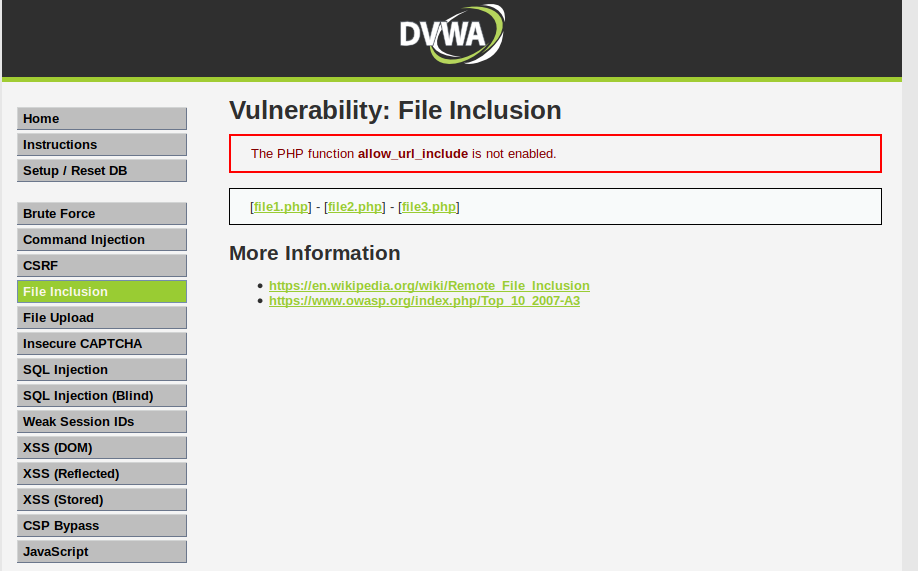
To follow along, click on the File Inclusion navigation link of DVWA, you should see a page like this:
Lets start by doing an LFI attack on the web application.
Looking at the URL of the web application we can see a parameter named page which is used to load different php pages on the website.
http://localhost:9000/vulnerabilities/fi/?page=include.php 
Since it is loading different pages we can guess that it is loading local pages from the server and executing them. Lets try to get the famous /etc/passwd file found on every linux, to do that we have to find a way to access it via our LFI. We will start with this:
../etc/passwd 
entering the above payload in the page parameter of the URL:
http://localhost:9000/vulnerabilities/fi/?page=../etc/passwd 
we get nothing back which means the page does not exist. Lets try to understand what we are trying to accomplish. We are asking for a file named passwd in a directory named etc which is one directory up from our current working directory. The etc directory lies at the root (/) of a linux file system. We tried to guess that we are in a directory (say www) which also lies at the root of the file system, that's why we tried to go up by one directory and then move to the etc directory which contains the passwd file. Our next guess will be that maybe we are two directories deeper, so we modify our payload to be like this:
../../etc/passwd 
we get nothing back. We continue to modify our payload thinking we are one more directory deeper.
../../../etc/passwd 
no luck again, lets try one more:
../../../../etc/passwd 
nop nothing, we keep on going one directory deeper until we get seven directories deep and our payload becomes:
../../../../../../../etc/passwd 
which returns the contents of passwd file as seen below:
This just means that we are currently working in a directory which is seven levels deep inside the root (/) directory. It also proves that our LFI is a success. We can also use php filters to get more and more information from the server. For example if we want to get the source code of the web server we can use php wrapper filter for that like this:
php://filter/convert.base64-encode/resource=index.php 
We will get a base64 encoded string. Lets copy that base64 encoded string in a file and save it as index.php.b64 (name can be anything) and then decode it like this:
cat index.php.b64 | base64 -d > index.php 
We will now be able to read the web application's source code. But you maybe thinking why didn't we simply try to get index.php file without using php filter. The reason is because if we try to get a php file with LFI, the php file will be executed by the php interpreter rather than displayed as a text file. As a workaround we first encode it as base64 which the interpreter won't interpret since it is not php and thus will display the text. Next we will try to get a shell. Before php version 5.2, allow_url_include setting was enabled by default however after version 5.2 it was disabled by default. Since the version of php on which our dvwa app is running on is 5.2+ we cannot use the older methods like input wrapper or RFI to get shell on dvwa unless we change the default settings (which I won't). We will use the file upload functionality to get shell. We will upload a reverse shell using the file upload functionality and then access that uploaded reverse shell via LFI.
Lets upload our reverse shell via File Upload functionality and then set up our netcat listener to listen for a connection coming from the server.
nc -lvnp 9999 
Then using our LFI we will execute the uploaded reverse shell by accessing it using this url:
http://localhost:9000/vulnerabilities/fi/?page=../../hackable/uploads/revshell.php 
Voila! We have a shell.
To learn more about File Upload Vulnerability and the reverse shell we have used here read Learning Web Pentesting With DVWA Part 5: Using File Upload to Get Shell. Attackers usually chain multiple vulnerabilities to get as much access as they can. This is a simple example of how multiple vulnerabilities (Unrestricted File Upload + LFI) can be used to scale up attacks. If you are interested in learning more about php wrappers then LFI CheetSheet is a good read and if you want to perform these attacks on the dvwa, then you'll have to enable allow_url_include setting by logging in to the dvwa server. That's it for today have fun.
Leave your questions and queries in the comments below.

References:

  1. FILE INCLUSION VULNERABILITIES: https://www.offensive-security.com/metasploit-unleashed/file-inclusion-vulnerabilities/
  2. php://: https://www.php.net/manual/en/wrappers.php.php
  3. LFI Cheat Sheet: https://highon.coffee/blog/lfi-cheat-sheet/
  4. File inclusion vulnerability: https://en.wikipedia.org/wiki/File_inclusion_vulnerability
  5. PHP 5.2.0 Release Announcement: https://www.php.net/releases/5_2_0.php


Read more


Wednesday, January 17, 2024

ChopChop - ChopChop Is A CLI To Help Developers Scanning Endpoints And Identifying Exposition Of Sensitive Services/Files/Folders


ChopChop is a command-line tool for dynamic application security testing on web applications, initially written by the Michelin CERT.

Its goal is to scan several endpoints and identify exposition of services/files/folders through the webroot. Checks/Signatures are declared in a config file (by default: chopchop.yml), fully configurable, and especially by developers.


"Chop chop" is a phrase rooted in Cantonese. "Chop chop" means "hurry" and suggests that something should be done now and without delay.


Building

We tried to make the build process painless and hopefully, it should be as easy as:

$ go mod download
$ go build .

There should be a resulting gochopchop binary in the folder.


Using Docker

Thanks to Github Container Registry, we are able to provide you some freshly-build Docker images!

docker run ghcr.io/michelin/gochopchop scan https://foobar.com -v debug

But if you prefer, you can also build it locally, see below:


Build locally
docker build -t gochopchop .

Usage

We are continuously trying to make goChopChop as easy as possible. Scanning a host with this utility is as simple as :

$ ./gochopchop scan https://foobar.com

Using Docker
docker run gochopchop scan https://foobar.com

Custom configuration file
docker run -v ./:/app chopchop scan -c /app/chopchop.yml https://foobar.com

What's next

The Golang rewrite took place a couple of months ago but there's so much to do, still. Here are some features we are planning to integrate : [x] Threading for better performance [x] Ability to specify the number of concurrent threads [x] Colors and better formatting [x] Ability to filter checks/signatures to search for [x] Mock and unit tests [x] Github CI And much more!


Testing

To quickly end-to-end test chopchop, we provided a web-server in tests/server.go. To try it, please run go run tests/server.go then run chopchop with the following command ./gochopchop scan http://localhost:8000 --verbosity Debug. ChopChop should print "no vulnerabilities found".

There are also unit test that you can launch with go test -v ./.... These tests are integrated in the github CI workflow.


Available flags

You can find the available flags available for the scan command :

Flag Full flag Description
-h --help Help wizard
-v --verbosity Verbose level of logging
-c --signature Path of custom signature file
-k --insecure Disable SSL Verification
-u --url-file Path to a specified file containing urls to test
-b --max-severity Block the CI pipeline if severity is over or equal specified flag
-e --export Export type of the output (csv and/or json)
--export-filename Specify the filename for the export file(s)
-t --timeout Timeout for the HTTP requests
--severity-filter Filter Plugins by severity
--plugin-filter Filter Plugins by name of plugin
--threads Number of concurrent threads

Advanced usage

Here is a list of advanced usage that you might be interested in. Note: Redirectors like > for post processing can be used.

  • Ability to scan and disable SSL verification
$ ./gochopchop scan https://foobar.com --insecure
  • Ability to scan with a custom configuration file (including custom plugins)
$ ./gochopchop scan https://foobar.com --insecure --signature test_config.yml
  • Ability to list all the plugins or by severity : plugins or plugins --severity High
$ ./gochopchop plugins --severity High
  • Ability to specify number of concurrent threads : --threads 4 for 4 workers
$ ./gochopchop plugins --threads 4
  • Ability to block the CI pipeline by severity level (equal or over specified severity) : --max-severity Medium
$ ./gochopchop scan https://foobar.com --max-severity Medium
  • Ability to specify specific signatures to be checked
./gochopchop scan https://foobar.com --timeout 1 --verbosity --export=csv,json --export-filename boo --plugin-filters=Git,Zimbra,Jenkins
  • Ability to list all the plugins
$ ./gochopchop plugins
  • List High severity plugins
$ ./gochopchop plugins --severity High
  • Set a list or URLs located in a file
$ ./gochopchop scan --url-file url_file.txt
  • Export GoChopChop results in CSV and JSON format
$ ./gochopchop scan https://foobar.com  --export=csv,json --export-filename results

Creating a new check

Writing a new check is as simple as :

  - endpoint: "/.git/config"
checks:
- name: Git exposed
match:
- "[branch"
remediation: Do not deploy .git folder on production servers
description: Verifies that the GIT repository is accessible from the site
severity: "High"

An endpoint (eg. /.git/config) is mapped to multiple checks which avoids sending X requests for X checks. Multiple checks can be done through a single HTTP request. Each check needs those fields:

Attribute Type Description Optional ? Example
name string Name of the check No Git exposed
description string A small description for the check No Ensure .git repository is not accessible from the webroot
remediation string Give a remediation for this specific "issue" No Do not deploy .git folder on production servers
severity Enum("High", "Medium", "Low", "Informational") Rate the criticity if it triggers in your environment No High
status_code integer The HTTP status code that should be returned Yes 200
headers List of string List of headers there should be in the HTTP response Yes N/A
no_headers List of string List of headers there should NOT be in the HTTP response Yes N/A
match List of string List the strings there should be in the HTTP response Yes "[branch"
no_match List of string List the strings there should NOT be in the HTTP response Yes N/A
query_string GET parameters that have to be passed to the endpoint String Yes query_string: "id=FOO-chopchoptest"

External Libraries
Library Name Link License
Viper https://github.com/spf13/viper MIT License
Go-pretty https://github.com/jedib0t/go-pretty MIT License
Cobra https://github.com/spf13/cobra Apache License 2.0
strfmt https://github.com/go-openapi/strfmt Apache License 2.0
Go-homedir https://github.com/mitchellh/go-homedir MIT License
pkg-errors https://github.com/pkg/errors BSD 2 (Simplified License)
Go-runewidth https://github.com/mattn/go-runewidth MIT License

Please, refer to the third-party.txt file for further information.


Talks

License

ChopChop has been released under Apache License 2.0. Please, refer to the LICENSE file for further information.


Authors
  • Paul A.
  • David R. (For the Python version)
  • Stanislas M. (For the Golang version)


More articles


  1. Hacker Techniques Tools And Incident Handling
  2. Hacker Tool Kit
  3. Hack App
  4. Free Pentest Tools For Windows
  5. Pentest Tools Kali Linux
  6. Hacker Tools Linux
  7. What Is Hacking Tools
  8. Pentest Tools Download
  9. Hacking Tools For Kali Linux
  10. Hack Tool Apk
  11. Hacking Tools For Windows
  12. How To Make Hacking Tools
  13. Hacking Tools Name
  14. Hacker Tools Windows
  15. Hacking Tools
  16. Hacking Tools Pc
  17. Pentest Tools Tcp Port Scanner
  18. Pentest Tools Nmap
  19. Hacker Tools
  20. Hack Rom Tools
  21. Hacking Tools For Windows Free Download
  22. Hack Tools 2019
  23. Pentest Tools Find Subdomains
  24. What Are Hacking Tools
  25. Hacking Tools For Beginners
  26. Hacking Apps
  27. What Is Hacking Tools
  28. Hack And Tools
  29. Hacking Tools Download
  30. Pentest Tools Tcp Port Scanner
  31. Hacking Tools Usb
  32. Pentest Tools Port Scanner
  33. Black Hat Hacker Tools
  34. Pentest Tools Tcp Port Scanner
  35. Hacking Tools
  36. Pentest Tools Subdomain
  37. Pentest Box Tools Download
  38. Easy Hack Tools
  39. Hacker Tools List
  40. Pentest Recon Tools
  41. Hack Tools Download
  42. Best Hacking Tools 2020
  43. Ethical Hacker Tools
  44. Pentest Tools Kali Linux
  45. Pentest Recon Tools
  46. Pentest Tools Find Subdomains
  47. Ethical Hacker Tools
  48. Pentest Tools Kali Linux
  49. Hacker Tools 2020
  50. Hacker Tools Linux
  51. Pentest Tools Kali Linux
  52. Pentest Tools Find Subdomains
  53. Pentest Tools Website
  54. Pentest Tools Find Subdomains
  55. Hacking Tools Kit
  56. Computer Hacker
  57. Underground Hacker Sites
  58. Termux Hacking Tools 2019
  59. Hack Tools
  60. Hacks And Tools
  61. How To Install Pentest Tools In Ubuntu
  62. New Hacker Tools
  63. Hacking Tools Github
  64. Pentest Recon Tools
  65. Hack Tools Github
  66. Pentest Tools For Windows
  67. Android Hack Tools Github
Related Posts with Thumbnails